
Recording captures a live performance. Mixing takes all the individual recorded tracks and shapes them into a single stereo file. Mastering then refines that stereo file to meet professional loudness standards, ready for release on Spotify, vinyl, or CD. These three stages happen in a fixed sequence, and each one demands different skills, different tools, and a different set of ears.
Most musicians know that something happens between the microphone and streaming - they just cannot pin down exactly what, or why there is a separate cost at every step. This guide walks through all three stages in plain English, with UK pricing, real workflow context, and honest advice about when to bring in a professional.
What Are the Three Stages of Music Production?
Music production follows a clear, sequential path. Here is the order every song travels through:
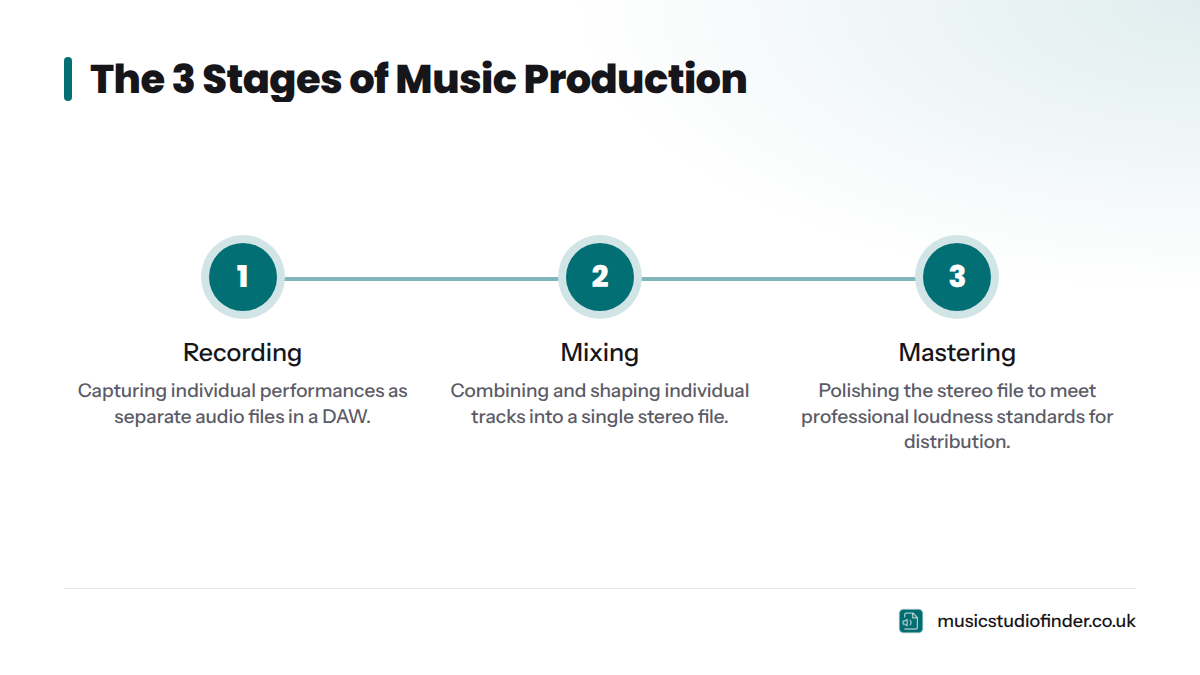
- Recording - Capturing individual performances (vocals, guitars, drums, keyboards) as separate audio files in a DAW (Digital Audio Workstation).
- Mixing - Combining those individual tracks, shaping each one with EQ, compression, and effects, then blending them into a single stereo file.
- Mastering - Polishing that stereo file to meet professional loudness standards and preparing it for distribution across streaming platforms, vinyl, or CD.
Each stage builds directly on the one before it. You cannot mix what has not been recorded, and you cannot master a file that has not been mixed. The order is non-negotiable.
Before recording begins, most professional projects go through a pre-production phase: arranging songs, setting tempos, rehearsing parts, and deciding on the sonic direction. After mastering comes distribution - uploading to Spotify, Apple Music, or physical formats. The three stages above sit at the heart of that journey.
Quick Answer: Recording captures the performance. Mixing balances and shapes the individual tracks. Mastering prepares the final stereo file for release. They happen in sequence, and each requires different skills and tools.
What Is Recording?
Capturing the Raw Material
Recording is the process of capturing musical performances as digital audio files. Every note a vocalist sings, every guitar riff, every drum hit - these are captured individually into a multitrack session inside a DAW. The goal is straightforward: get the performance down as cleanly, accurately, and expressively as possible.
Think of recording as building the raw materials. Everything that follows in mixing and mastering depends entirely on what gets captured here. A great mix cannot fix a badly recorded vocal. A great master cannot fix a badly mixed track.
What Happens During a Recording Session
A typical session starts with the signal chain: sound travels from an acoustic source - a voice, a guitar string, a drum skin - into a microphone, through a preamp (which amplifies the signal to a usable level), into an audio interface or mixing console, and finally into the DAW as a digital audio file.
The recording engineer sets input levels carefully to avoid clipping - where the signal exceeds the maximum level and distorts - while maintaining enough headroom for clean, dynamic recordings. This process is called gain staging, and it matters enormously for everything that follows.
Once levels are set, the artist performs. The engineer records multiple takes - full or partial performances - and then uses a technique called comping to select the best moments from each take and stitch them together into a single, seamless performance. A lead vocalist might record eight takes of a chorus, and the engineer picks the best phrase from each one.
If a musician fluffs a line mid-take, the engineer can perform a punch-in: dropping into record at the exact moment needed to fix only the mistake, leaving the rest of the take intact. For a detailed look at what a full session looks like from the inside, the professional recording session guide from Music Studio Finder covers the process step by step.
Who Is Involved in the Recording Stage?
Three key roles are present at most professional recording sessions:
- Recording Engineer - Operates the technical side: microphone placement, gain staging, routing, and session management. A skilled recording engineer is also responsible for getting the best performance out of the room's acoustics. Read more in the article on what a recording engineer does - Music Studio Finder.
- Music Producer - Directs the creative side: song arrangements, performance direction, sonic vision. The producer decides whether a second take is needed because the feel was wrong; the engineer decides whether a second take is needed because the microphone clipped. The difference between a music producer and a recording engineer - Music Studio Finder is worth understanding before you book.
- Session Musicians - Hired instrumentalists brought in to play specific parts when the core artist or band does not play those instruments.
Some studios include an engineer in the hire fee; others charge separately. The guide on whether recording studios provide an audio engineer - Music Studio Finder clears up what to expect.
Equipment Used for Recording
| Equipment | Role |
|---|---|
| Condenser microphone (e.g., Neumann U87) | Capturing vocals, acoustic instruments, overhead cymbals |
| Dynamic microphone (e.g., Shure SM7B) | Close-micing guitar amps, snare drums, broadcast-style vocals |
| Preamp (e.g., Neve 1073, API 512c) | Amplifying the mic signal with character and colour |
| Audio interface (e.g., Focusrite Scarlett, RME Babyface) | Converting analogue signal to digital |
| DAW (Pro Tools, Logic Pro, Ableton Live, Cubase) | Hosting and managing the multitrack session |
| Studio monitors | Accurate playback for the engineer to assess what is being captured |
Bit depth and sample rate are set before recording begins. Professional sessions typically record at 24-bit / 44.1kHz or 24-bit / 48kHz. Some studios record at 24-bit / 96kHz for extra headroom in post-production. Higher bit depths provide more dynamic range and more tolerance for small gain staging errors - standard practice in professional studios.
Professional Studio vs Home Studio for Recording
| Factor | Professional Studio | Home Studio |
|---|---|---|
| Acoustics | Treated rooms, live room isolation, controlled environment | Often untreated, reflections and room noise present |
| Equipment | High-end microphones, preamps, consoles, outboard gear | Entry-to-mid-level gear (varies widely) |
| Monitoring | Calibrated studio monitors in treated control room | Consumer speakers or headphones |
| Cost | £25-£300+ per hour (UK range) | Largely equipment investment only |
| Result | Consistent, broadcast-ready recordings | Can be excellent with skill; often requires corrective mixing |
| Engineer | Usually included or available | Typically self-engineered |
For a fuller breakdown of the trade-offs, the recording studio vs home studio guide - Music Studio Finder goes through acoustics, cost, and outcomes in detail. If you want to know what a professional studio session actually looks like, how to prepare for your first studio session - Music Studio Finder is the place to start.
How Long Does Recording Take?
Recording time varies depending on the number of tracks, the complexity of the arrangement, and how well-rehearsed the performers are. A rough guide for a single song in a professional UK studio:
- Well-rehearsed band recording a live-feel track: 1-2 days
- Pop or hip-hop track with layered vocals and overdubs: 1-3 days
- Full album (10 songs, full band): 5-15 days
The guide on how many hours to book in a recording studio - Music Studio Finder gives practical advice for estimating your session length before you commit to a booking.
What Is Mixing?
Shaping the Multitrack into a Stereo Mix
Mixing is the process of taking every individual recorded track - kick drum, snare, hi-hats, bass, rhythm guitar, lead guitar, piano, lead vocal, backing vocals - and shaping, balancing, and blending them into a single, cohesive stereo file called the stereo mixdown.
If recording is laying the bricks, mixing is building the house. The mixing engineer's job is to give every element its own space in the frequency spectrum, prevent elements from clashing, build depth and dimension, and create an emotional impact that serves the song.
What Happens During the Mixing Stage?
The mixing engineer opens the multitrack session in a DAW and works through several interdependent processes.
Levels and panning come first. Every track gets a volume and a position in the stereo field - kick drum and bass guitar usually sit in the centre; rhythm guitars are often panned left and right; lead vocals stay in the centre. This creates width and separation before any processing begins.
EQ (equalisation) shapes the tonal character of each track and removes problem frequencies. A mixing engineer might roll off low-end mud from an acoustic guitar, boost presence on a lead vocal, or cut a harsh frequency that makes a snare drum ring uncomfortably. FabFilter Pro-Q 3 - FabFilter is widely used by mixing engineers for surgical EQ work.
Compression controls the dynamic range of individual tracks. A vocal compressor reduces the gap between the quietest and loudest notes, producing a more consistent sound. Parallel compression - blending an uncompressed signal with a heavily compressed one - adds density without killing the life of a performance.
Reverb, delay, and time-based effects add depth and space. A short hall reverb on a snare drum places it in a room. A slapback delay on a vocal adds weight. A lush stereo reverb on a guitar part creates atmosphere. These effects sit on send/return (or aux) tracks, letting multiple tracks share a single effect unit while keeping the session manageable.
Automation brings the mix to life over time. The mixing engineer might raise the vocal slightly in the chorus, mute a guitar during a verse breakdown, or gradually increase a reverb tail during a final outro. Without automation, a mix is static - with it, the mix breathes.
Stem organisation helps manage complex sessions. A mix engineer often groups related tracks - all drum mics to a drum bus, all backing vocals to a vocal bus - allowing global control over each group before hitting the master bus (or mix bus), which carries the final combined signal.
One point worth flagging about the master bus during mixing: most experienced engineers keep it clean, applying minimal processing. Heavy master bus work - limiting, loudness maximisation - belongs to mastering, not mixing. A mix bus limiter during the session is simply there to prevent clipping and give a rough idea of loudness. It is not a substitute for mastering.
This short video from Sweetwater explains the core concepts of mixing and mastering in plain terms:
Who Is the Mixing Engineer?
The mixing engineer is a specialist who focuses entirely on the balance and polish of the finished multitrack session. On independent or budget recordings, the recording engineer and the mixing engineer are often the same person. On major commercial releases, they are almost always different people - the objectivity of fresh ears makes a real difference at this stage.
A mixing engineer who had no involvement in the recording session comes to the tracks without emotional attachment to any particular take or performance. That distance makes it easier to make tough decisions: admitting a guitar part does not serve the song, or that the snare needs replacing with a sample.
Tools and Software Used for Mixing
| Category | Common Tools |
|---|---|
| DAWs | Pro Tools, Logic Pro X, Ableton Live, Cubase, Studio One |
| EQ plugins | FabFilter Pro-Q, Waves SSL E-Channel, API 550 emulations |
| Compression plugins | FabFilter Pro-C, Universal Audio 1176, SSL G-Bus Compressor |
| Reverb plugins | Valhalla Room, Lexicon 480L emulations, UAD Capitol Chambers |
| Saturation / harmonic excitement | Soundtoys Decapitator, UAD Studer A800, Waves Abbey Road Saturator |
| Metering | iZotope Insight, Waves WLM Plus, Nugen Audio MasterCheck |
Pro Tools, developed by Avid, remains the industry standard in professional mixing rooms globally. Logic Pro X is dominant among independent producers on Mac. Ableton Live is particularly popular in electronic music production. All of these are capable of delivering broadcast-quality mixes.
Working in a Multi-Track Environment
The mixing engineer works from a multitrack session - often 30, 60, or even 100+ individual audio tracks depending on the size of the project. A full pop album session might include 16 drum tracks alone: kick in, kick out, snare top, snare bottom, hi-hat, four rack toms, floor tom, overhead left, overhead right, room left, room right, plus a mono room mic.
The mix engineer organises these tracks into buses, assigns processing, and works toward the final stereo mixdown: a single two-channel audio file (WAV or AIFF, typically at 24-bit / 44.1kHz or higher) that gets handed to the mastering engineer.
How Long Does Mixing Take?
A single song mixed from a clean, well-organised session typically takes a professional mixing engineer 4-8 hours. More complex sessions - many tracks, extensive automation, or significant corrective work - can take longer. Albums are often quoted on a per-song basis, with experienced engineers working through a full album over 5-10 days.
What Is Mastering?
The Final Stage Before Release
Mastering is the last stage of audio post-production before a recording reaches listeners. The mastering engineer works from a single stereo mixdown - or stems, in the case of stem mastering - and applies subtle, macro-level processing to bring the track to professional loudness, ensure it translates across all playback systems, and prepare the audio files for delivery to streaming platforms, vinyl pressing plants, or CD replicators.
Mastering is not mixing. The mastering engineer does not have access to individual tracks - only the finished stereo file. Their role is to refine, not rebuild.
What Happens During the Mastering Stage?
Macro-level EQ adjusts the overall tonal balance of the stereo mix. If a mix sounds slightly bass-heavy on the mastering engineer's calibrated monitors, a gentle shelving cut below 80Hz corrects it. These are small, precise adjustments - mastering EQ moves are often measured in fractions of a decibel.
Compression on the master bus gently controls the overall dynamic range, making the track feel more cohesive and energetic. A mastering compressor like the Universal Audio Fairchild 670 adds subtle glue that ties the mix together.
Limiting and loudness maximisation is where the track reaches its release loudness. A limiter - such as iZotope Ozone's Maximizer - brings the peak and integrated loudness up to meet the targets set by streaming platforms, without causing audible distortion.
Stereo enhancement and mid/side (M/S) processing can widen or tighten the stereo image. M/S processing lets the mastering engineer treat the centre of the stereo field (vocals, bass, kick drum) separately from the sides (room reverb, wide guitars). Used carefully, this adds spaciousness without compromising mono compatibility.
Sequencing applies when mastering an album or EP: the mastering engineer arranges tracks in the correct order, sets the gaps between songs, and ensures consistent loudness and tonal balance across the whole release.
Metadata embedding adds the song title, artist name, ISRC codes, and copyright information directly into the audio file. This metadata travels with the file through distribution and helps ensure correct crediting on streaming platforms.
Who Is the Mastering Engineer?
The mastering engineer is arguably the most specialised role in the entire production chain. They work in acoustically pristine, carefully calibrated rooms with reference-grade monitoring systems, listening for issues that no other set of ears has caught: phase problems, low-frequency build-up that only appears on large speaker systems, harshness in the upper midrange that will fatigue listeners on earbuds.
The Audio Engineering Society (AES), the international authority on audio standards, sets guidelines that inform the practices of professional mastering engineers worldwide. Well-known mastering studios include Abbey Road Studios in London, whose mastering suite has produced definitive versions of some of the most commercially significant records ever made.
Mastering for Streaming Platforms in 2026
Every major streaming platform applies loudness normalisation: the platform measures the integrated loudness of uploaded tracks and automatically turns them down to meet a target level. Tracks that are louder than the platform target get turned down - not rewarded. The practical implication is clear: over-compressing or brick-wall limiting a master to chase maximum loudness achieves nothing. Dynamic range matters.
Here are the current loudness targets for the major streaming platforms in 2026:
| Platform | Integrated Loudness Target | True Peak Maximum | Notes |
|---|---|---|---|
| Spotify | -14 LUFS | -1 dBTP | Normalises louder tracks down; tracks below -14 LUFS are left at their native level |
| Apple Music | -16 LUFS | -1 dBTP | Apple Digital Masters standard recommends headroom; loudness normalisation on by default |
| YouTube Music | -14 LUFS | -1 dBTP | Same target as Spotify; YouTube applies normalisation to all content |
| Tidal | -14 LUFS | -1 dBTP | Masters for HiFi and Max tiers should be high-resolution WAV or FLAC |
| Amazon Music | -14 LUFS | -1 dBTP | Unlimited HD tier supports 24-bit / 192kHz files |
| CD / Physical | Around -9 to -12 LUFS | 0 dBFS | No normalisation; loudness war still applies to physical formats |
LUFS stands for Loudness Units relative to Full Scale, the international standard measurement for integrated loudness defined under ITU-R BS.1770 - International Telecommunication Union. True Peak refers to the maximum instantaneous signal level, measured in dBTP (decibels True Peak) - not the same as regular peak levels, and important because inter-sample peaks can cause distortion during format conversion.
The practical takeaway: master your music to around -14 LUFS integrated, with a true peak of no higher than -1 dBTP, and you will be in the right territory for most major streaming platforms.
Stem Mastering vs Standard Mastering
Standard mastering works from a single stereo mixdown file. Stem mastering works from a small set of grouped stereo files - stems - such as drums, bass, guitars, keys, and vocals. This gives the mastering engineer a modest degree of control over individual elements without accessing the full multitrack session.
Stem mastering costs more than standard mastering - typically 50-100% more per song - because it requires more work. It makes sense in specific situations: when the mix has an element the mastering engineer cannot correct on the stereo bus alone, or when the mix and mastering engineers are working collaboratively on a complex project. For most releases, standard mastering from a clean, well-prepared stereo mixdown is entirely sufficient.
How Long Does Mastering Take?
A single song typically takes a professional mastering engineer 1-3 hours, including listening, processing, quality checks, and file delivery in multiple formats. An album of 10 songs can usually be mastered in a full working day, assuming the mixes arrive in good shape.
Recording vs Mixing vs Mastering at a Glance
| Factor | Recording | Mixing | Mastering |
|---|---|---|---|
| Goal | Capture performances cleanly | Balance and shape all tracks into a stereo mix | Refine stereo mix for release |
| Input | Live performance / acoustic source | Multitrack session (many individual files) | Stereo mixdown (single stereo file) |
| Output | Multitrack session files | Stereo mixdown (WAV/AIFF) | Master file (WAV/AIFF/DDP/FLAC) |
| Who does it | Recording engineer (+ producer) | Mixing engineer | Mastering engineer |
| Key tools | Microphones, preamps, interface, DAW | DAW, EQ, compressors, reverb, automation | Mastering EQ, bus compressor, limiter, metering |
| Typical UK cost | £25-£300+/hr (studio hire) | £50-£400/song | £25-£150/song |
| Typical duration | Hours to days per song | 4-8 hours per song | 1-3 hours per song |
| Works with | Acoustic instruments, voices, MIDI | Individual audio tracks | One stereo file |
| Can fix problems from previous stage? | N/A - this is the start | Partially (corrective mixing) | Minimally - cannot fix a bad mix |
How Recording, Mixing, and Mastering Work Together
The journey from idea to streaming follows five steps:
- Pre-production - Arrange the songs, set tempos, rehearse parts, plan the recording schedule.
- Recording - Track all instruments and vocals into the DAW.
- Mixing - Combine, shape, and balance all tracks into a stereo mixdown.
- Mastering - Refine the stereo mixdown to professional loudness and quality standards.
- Distribution - Upload the mastered files to streaming platforms via a distributor such as DistroKid or TuneCore.
You cannot reorder these stages. Mastering a raw, unmixed multitrack is not possible - the mastering engineer receives only a stereo file. Mixing without recording first is obviously not possible either. Each stage consumes the output of the previous one.
Why sequence matters: the "garbage in, garbage out" principle
If the recording stage produces poor results - excessive room noise, clipping, out-of-tune performances, badly placed microphones - the mixing engineer faces a much harder job. Corrective mixing is possible: noise reduction, pitch correction with tools like Melodyne, drum replacement with samples. But every corrective step costs time and money, and the result is rarely as good as a clean original recording.
Equally, if the mix is poorly balanced - with a boomy low end, no separation between elements, and an over-compressed master bus that leaves no headroom - the mastering engineer has almost nothing to work with. The most common feedback from mastering engineers on an unmixed session sent directly to them: "I can tell something is wrong, but I cannot fix it from here."
Sound on Sound magazine has documented numerous cases where mastering engineers had to turn tracks away because the mix was not in a workable state. Preparation at every stage protects the investment you make at the next one.
What happens when mastering is attempted on a poorly mixed track?
The mastering engineer can apply broad EQ, but cannot separate the kick drum from the bass guitar - those decisions were made in the mix. They can apply limiting, but if the mix is already too compressed, limiting adds distortion and pumping artefacts. They can widen the stereo image, but if the mix has phase problems, widening makes them worse. The honest truth: mastering amplifies the qualities of the mix, good and bad.
Do You Need All Three Stages?
The short answer is: it depends on what you are releasing and where. Here is a practical decision framework:
Releasing commercially to streaming platforms? Yes - professional recording, mixing, and mastering are all recommended.
Recording a home demo for songwriting feedback? Mixing may be sufficient. Basic levels and a rough balance are enough for early-stage creative decisions.
Recording a demo to pitch to a label or sync library? The recording should be as clean as possible. A professional mix is strongly advisable. Mastering is recommended if the demo needs to sound competitive next to released tracks.
Releasing a single to Spotify and Apple Music? Yes to all three. Streaming platforms normalise loudness, so an unmastered track will sound quieter, thinner, and less authoritative next to mastered commercial releases.
Recording a podcast or spoken word release? Recording quality matters most. Mixing is minimal (levels, noise reduction). Mastering to Spotify podcast loudness targets (-16 LUFS) is advisable for consistency.
Can One Person Do All Three?
Yes - and many independent artists and producers do exactly that. Recording, mixing, and mastering your own music is entirely achievable, particularly with modern DAWs and plugin tools. The challenge is objectivity. When you have spent three days recording and two days mixing a track, your ears are too accustomed to it to make truly objective mastering decisions. Reference tracks - comparing your mix against commercially released songs in a similar genre - help enormously.
The question of whether to book a recording studio without a producer - Music Studio Finder is closely related: you can do it, but knowing when to bring in expertise is what separates good releases from great ones.
When to Hire a Professional Recording Engineer
Hire a professional recording engineer when the acoustic quality of your home space would compromise the recording, when you are tracking live drums (which require multiple microphones and complex routing), or when the performance itself will benefit from having a technically focused engineer in the room so the performer can concentrate entirely on playing.
When to Hire a Professional Mixing Engineer
Hire a professional mixing engineer when the song is a commercial release, when you have spent more than a day trying to fix a mix that still does not sound right, or when you want the objectivity of a fresh set of ears. A professional mix engineer brings both technical skill and emotional distance - a combination that is genuinely difficult to replicate when you wrote and recorded the song yourself.
When to Hire a Professional Mastering Engineer
Hire a professional mastering engineer for any release that will sit alongside commercial music on streaming platforms or physical formats. AI mastering services such as LANDR and eMastered offer fast, affordable options for demos and low-stakes releases. For a debut single, an album, or anything being pitched to industry contacts, a human mastering engineer is worth the investment - they listen critically in a way that algorithms currently cannot fully replicate.
What Does Each Stage Cost in the UK?
Recording Studio Costs in the UK
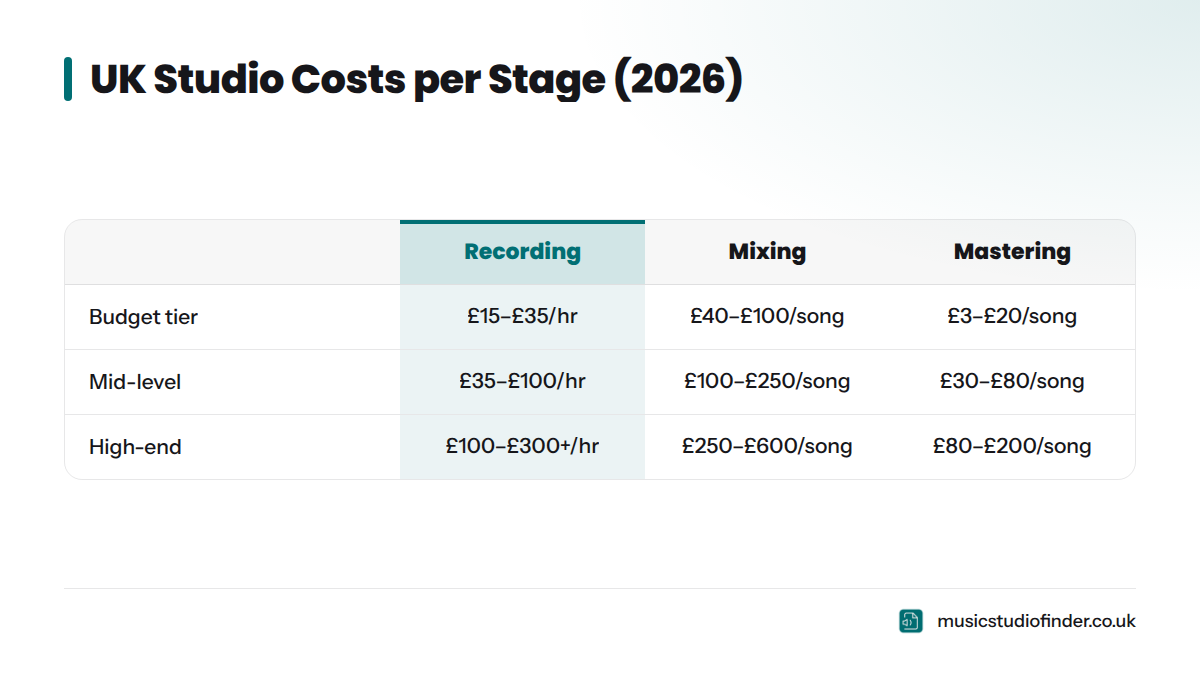
UK recording studio rates in 2026 vary significantly depending on the size of the room, the quality of the equipment, and the location. Here is a realistic overview:
| Studio Type | Hourly Rate | Day Rate (10 hrs) |
|---|---|---|
| Budget / local studios | £15-£35/hr | £120-£280/day |
| Mid-range professional studios | £35-£100/hr | £300-£800/day |
| High-end / London studios | £100-£300+/hr | £800-£2,500+/day |
Most studio hire fees include the room and basic equipment. Some include an engineer; others charge separately - typically £15-£40/hr on top of the room rate. For a thorough breakdown of what to expect to pay, the recording studio cost UK guide - Music Studio Finder covers pricing across different regions and studio tiers. Musicians on a tight budget should also read the guide on finding an affordable recording studio in the UK - Music Studio Finder.
Mixing Costs in the UK
UK mixing rates in 2026:
| Experience Level | Per Song | Per Album (10 songs) |
|---|---|---|
| Emerging engineer | £40-£100/song | £350-£800 |
| Mid-level professional | £100-£250/song | £800-£2,000 |
| Experienced / credits | £250-£600/song | £2,000-£5,000+ |
Many engineers offer revision rounds included in the price - typically two or three. Be clear on this before commissioning. Online mixing services - where you upload your files and receive a mixed WAV back - have made professional mixing more accessible than ever.
Mastering Costs in the UK
UK mastering rates in 2026:
| Service Type | Per Song | Per Album (10 songs) |
|---|---|---|
| AI mastering (LANDR, eMastered) | £3-£20/song | £20-£80 |
| Emerging mastering engineer | £30-£75/song | £250-£600 |
| Professional mastering engineer | £75-£200/song | £600-£1,800 |
| Specialist / major label engineer | £200-£500+/song | £1,800-£4,500+ |
Stem mastering typically adds 50-100% to the per-song cost due to the additional processing involved.
Bundle Deals: Recording + Mixing + Mastering
Many studios and producers offer bundled packages for artists who want to handle all three stages in one place. Typical UK bundle deals for a single song in 2026 range from £250 to £1,000+ depending on the studio tier. A full album bundle at a mid-range studio might come in at £2,500 to £6,000 for recording (multiple days), mixing, and mastering combined.
Bundles can represent genuine value, particularly when the producer handles both recording and mixing - the session is set up for mixing from the start, with a coherent signal chain and consistent gain staging throughout.
Common Mistakes at Each Stage
Common Recording Mistakes
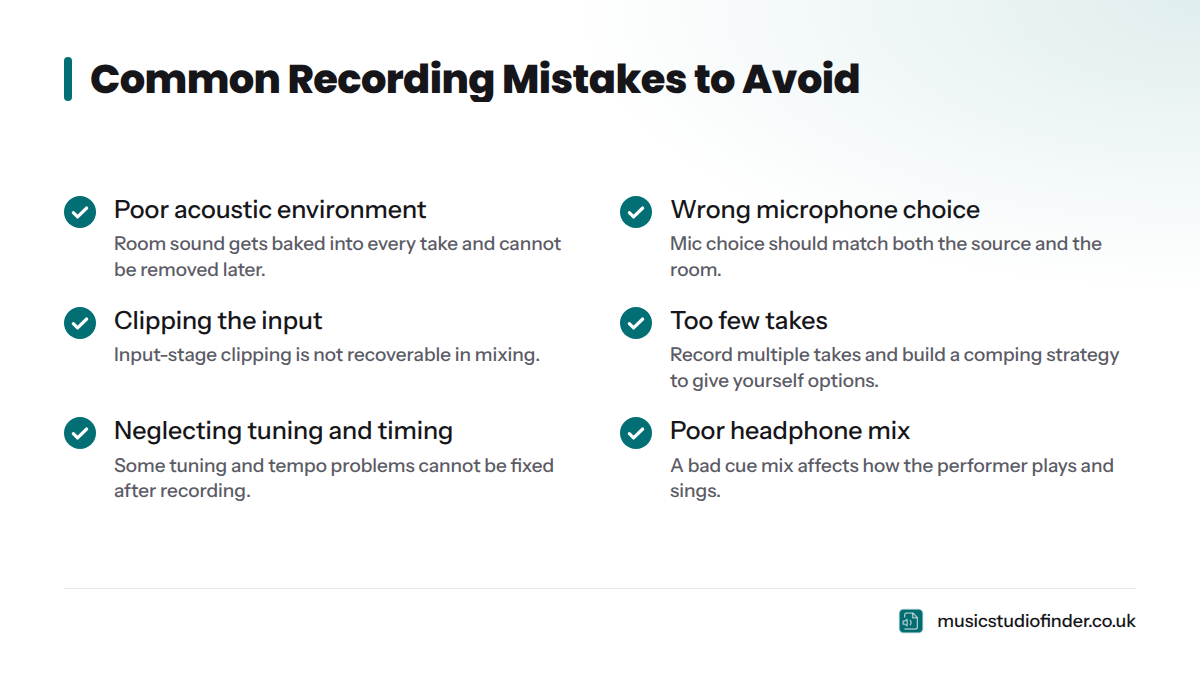
- Poor acoustic environment - Recording in an untreated room without considering reflections, bass build-up, or external noise. The room sound gets baked into every take.
- Wrong microphone choice - Using a large-diaphragm condenser on a guitar amp in a reflective room, or a dynamic microphone on a whisper-quiet acoustic guitar. Microphone choice should match the source and the room.
- Clipping the input - Setting gain too high and allowing the signal to distort before it reaches the DAW. Clipping at the input stage is not recoverable in mixing.
- Insufficient takes / no comping strategy - Recording only one or two takes and committing to the first acceptable one. Give yourself options.
- Neglecting tuning and timing - Recording out-of-tune instruments or rushing a tempo without a click track, hoping it will be fixed in mixing. Some problems genuinely cannot be fixed after the fact.
- No headphone mix for the performer - A vocalist recording with a poor monitor mix in their headphones will perform differently. Cue mix quality affects take quality.
Before your next studio session, what to bring to a recording studio session - Music Studio Finder is a practical checklist to ensure you arrive prepared.
Common Mixing Mistakes
- Mixing too loud - Ear fatigue sets in quickly at high monitoring levels. Professional mixing engineers regularly check mixes at low volumes - the Fletcher-Munson loudness curves mean that balance judgements made at high volumes do not translate accurately to quieter listening levels.
- Too much reverb on everything - A common beginner instinct. Reverb adds space but also reduces clarity and perceived loudness. Use it purposefully.
- Neglecting the low end - Mixing on speakers that do not reproduce bass accurately means low-end decisions are made blind. Reference on headphones and on different playback systems.
- Over-compressing tracks - Compression that kills the dynamics of a performance makes the mix feel flat and lifeless. Dynamics create emotion.
- Not using reference tracks - Mixing without comparing your work to commercially released tracks in a similar genre is like painting in a dark room. Reference tracks reveal imbalances your ears have stopped hearing.
- Leaving the master bus heavily processed - Heavy limiting and saturation on the mix bus during the mix session leaves no headroom for mastering. The mastering engineer needs approximately -6 dBFS of headroom on the final mixdown.
Common Mastering Mistakes
- Over-limiting - Chasing loudness by applying excessive limiting crushes dynamic range, introduces distortion artefacts, and results in a track that sounds fatiguing on streaming platforms - and gets turned down by normalisation anyway.
- Not checking mono compatibility - A master that sounds wide in stereo but collapses to nothing in mono will sound terrible on phone speakers, smart speakers, and club PA systems that sum to mono.
- Using heavy mastering EQ to fix a mix problem - Mastering EQ cannot separate individual elements. If the kick drum is too loud, the mix needs revisiting - not the master.
- Not metering to streaming targets - Delivering a master at -8 LUFS integrated to Spotify simply means Spotify turns it down to -14 LUFS automatically, negating all that limiting effort.
- Sending the mastering engineer a squashed file - The mix file sent to mastering should have peaks around -6 dBFS, no brick-wall limiting on the master bus, and no normalisation applied.
Checklist: Before You Send Files to Your Mastering Engineer
- Remove all limiting and heavy compression from the master bus
- Ensure peaks sit no higher than -6 dBFS (leave headroom)
- Export as 24-bit WAV or AIFF at the session sample rate
- No normalisation applied to the export
- Provide reference tracks in the same genre
- Clearly label files (Artist Name - Song Title - Mix v1.wav)
- Note any specific concerns (e.g., "kick feels light on earbuds")
How to Find the Right Professional for Each Stage
Finding the right studio or engineer is as much about fit and communication as it is about technical credits. Here is how to approach each stage.
Finding a recording studio in the UK starts with understanding what type of room you need. A full live room for drums is a very different requirement from a vocal booth for overdubs. Music Studio Finder is the UK's dedicated platform for finding and comparing recording studios - from large commercial studios in London to specialist rooms in Edinburgh, Newcastle, Belfast, and beyond. The guide on how to choose a recording studio - Music Studio Finder walks through every factor worth evaluating before you commit.
Finding a mixing engineer can be done online via platforms like SoundBetter or through direct referrals from your recording studio. Listen to their portfolio - specifically to music in your genre. A mixing engineer whose credits are all in heavy metal may not be the right fit for a jazz trio.
Finding a mastering engineer follows the same principle. Portfolio listening matters enormously. One UK professional listed on Music Studio Finder is Rob Hobson, a producer and mixing and mastering engineer based in York, offering services that cover both the mixing and mastering stages - the kind of professional who can take an artist from multitrack session to release-ready master in one coherent workflow.
In my experience, the best engineers are the ones who ask about your references and your goals before they touch a single fader. An engineer who listens first is worth far more than one who talks about their gear.
Frequently Asked Questions
Is mixing harder than mastering?
They require different skills rather than different difficulty levels. Mixing is technically broader - the engineer manages dozens or hundreds of tracks, complex routing, creative effects decisions, and automation over the entire duration of a song. Mastering is technically narrower but requires exceptional ears, a perfectly calibrated listening environment, and deep knowledge of delivery standards. Many engineers say mastering is harder to learn because the margin for error is so small - a 0.5dB EQ move on a single mastering band affects the entire song simultaneously.
Can you mix and master your own music?
Yes. Many independent artists do both, particularly at the demo or early release stage. Modern DAWs and tools like iZotope Ozone make DIY mastering more accessible than ever. The limitation is objectivity: it is genuinely difficult to hear your own music accurately after spending days recording and mixing it. If you do self-master, take a long break from the track before your mastering session - 24 hours minimum - and reference heavily against commercial releases in the same genre.
What are the most common mastering mistakes?
Over-limiting and loudness chasing are the most common. Because streaming platforms normalise loudness, a master at -8 LUFS will simply be turned down to -14 LUFS on Spotify - all that limiting was destructive rather than helpful. Other frequent mistakes include not checking mono compatibility, applying heavy EQ to fix mix problems that cannot be solved at the mastering stage, and sending a mixdown that already has heavy bus compression applied.
Do I need a mixing engineer if I already have a recording engineer?
Not always. Many recording engineers are also skilled mix engineers, and some studios include mixing in their session packages. The distinction matters most at a commercial level: for major releases, separate mixing and mastering engineers are standard practice because fresh ears and specialist expertise at each stage produce measurably better results. For independent releases, a skilled all-in-one engineer is often the most practical and cost-effective approach.
Can AI mix and master a song?
AI mastering tools - such as LANDR and eMastered - can produce listenable results for demos and low-stakes releases. They apply algorithmic loudness targets, basic EQ curves, and limiting based on genre analysis. AI mixing tools are less developed; while tools exist that can auto-balance levels and apply basic processing, they do not yet match the creative decision-making, emotional intelligence, and reference-track comparison that a skilled human mixing engineer brings. For any serious commercial release, a human engineer remains the benchmark.
What is the difference between a mixing engineer and a mastering engineer?
A mixing engineer works on individual tracks within a multitrack session, shaping each element and blending them into a stereo mix. A mastering engineer works only on the finished stereo mixdown, applying subtle macro-level processing and preparing the file for distribution. Their tools overlap - both use EQ and compression - but their inputs, outputs, and objectives are entirely different.
What file format should I send to a mastering engineer?
Send a 24-bit WAV or AIFF file at your session's native sample rate (44.1kHz, 48kHz, or 96kHz). Do not convert to MP3 or apply normalisation. Remove any limiting or heavy compression from the master bus before exporting. Leave approximately 6 dB of headroom (peaks around -6 dBFS). Include your reference tracks and any notes about the mix.
What is stem mastering?
Stem mastering is a process where the mastering engineer receives a small set of grouped stereo files - stems - such as drums, bass, guitars, and vocals, rather than a single stereo mixdown. This gives the mastering engineer slightly more control over individual elements. It costs more than standard mastering and is not necessary for most releases. It makes sense when specific elements of the mix need adjustment that cannot be achieved on the stereo bus alone.
How loud should my mix be before mastering?
The mix export sent to your mastering engineer should have peaks sitting around -6 dBFS, with no limiting or brick-wall compression on the master bus. Integrated loudness of the mix file before mastering is typically in the range of -18 to -14 LUFS - the mastering engineer will bring this up to the appropriate target (around -14 LUFS for most streaming platforms) using a limiter as part of their process.
What is the difference between recording and producing?
A recording engineer captures and manages the technical process of tracking audio - microphone placement, gain staging, routing, and session management. A music producer oversees the creative direction of the entire project: song arrangement, sonic vision, tempo, key, instrumentation, and the performance itself. On major projects, these are separate roles; on independent projects, one person often handles both. The difference between a music producer and a recording engineer - Music Studio Finder is explored in full on the Music Studio Finder blog.
Sources
- Loudness Normalisation - Spotify for Artists
- Apple Digital Masters - Apple Music
- Audio normalisation in YouTube - Google Support
- Audio Engineering Society (AES)
- Sound On Sound Magazine
- ITU-R BS.1770 Loudness Standard - International Telecommunication Union
- FabFilter Pro-Q 3 - FabFilter
- iZotope Ozone Mastering Suite - iZotope
- LANDR - AI Mastering Platform
- eMastered - AI Mastering
- Avid Pro Tools
- Recording Studio Cost UK: 2026 Pricing Guide - Music Studio Finder
- What Does a Recording Engineer Do? - Music Studio Finder
- Music Producer vs Recording Engineer - Music Studio Finder
- Rob Hobson Producer, Mixing & Mastering in York - Music Studio Finder
- How to Choose a Recording Studio - Music Studio Finder
- Recording Studio vs Home Studio - Music Studio Finder
- Find an Affordable Recording Studio UK - Music Studio Finder